Find what’s hiding in your agent traces
Your agents generate more traces than anyone can read. FriskAI sifts through every one and surfaces what deserves your attention, from loops that go nowhere and tools that keep failing to the requests your users keep making.

Works with
- Python SDK
- TypeScript SDK
- LangChain and LangGraph
- Claude Agent SDK
- Strands Agents
- Mastra
- Claude Codeearly access
- OpenTelemetryearly access
- Datadogearly access
- Langfuseearly access
- Logs and exportscustom pipeline
Three tool calls, 1,516 tokens and a failed run nobody noticed
The trace stops there. FriskAI records the same session with what the user asked, what the agent tried, what came back and how it ended.
- session
- 6c118cf7 · IT Ops
- tool_calls
- 3
- tokens
- 1,516 (1,317 in · 199 out)
- model
- friskai-oss:20b
Asked
“metrics-ingest is suddenly throwing a lot of errors in prod-apse2. Can you check what’s going on?”
Intent
Service Issue Diagnosis
Path
get_metrics, then search_logs
Returned
423 errors in the logs, led by an expired TLS certificate
Outcome
Failed
Every session keeps its full trace, with the arguments and output of each call. See a session
What thousands of sessions tell you
What users ask
We group each agent’s requests into intents, so you can see what people want from it and which asks are growing.
See intentsHow agents work
Every path an agent takes through its tools, ranked so the ones that fail or drag show up first.
See sequencesWhich tools carry risk
Each tool gets a risk score, and the ones that change something in the real world, like issuing a refund, are flagged as irreversible.
See the tool registry
Every finding tells you how sure it is
A finding starts with what happened. Then it tries to answer why, where it’s heading and what to change. Each answer shows how much evidence is behind it, and it gets firmer as more sessions come in. When you ship a fix, we check whether it worked.
- L1What happened
- L2Why, traced to a recorded change or the sessions it hit
- L3Where it’s heading over the next 30 days
- L4What to change, and whether the change worked
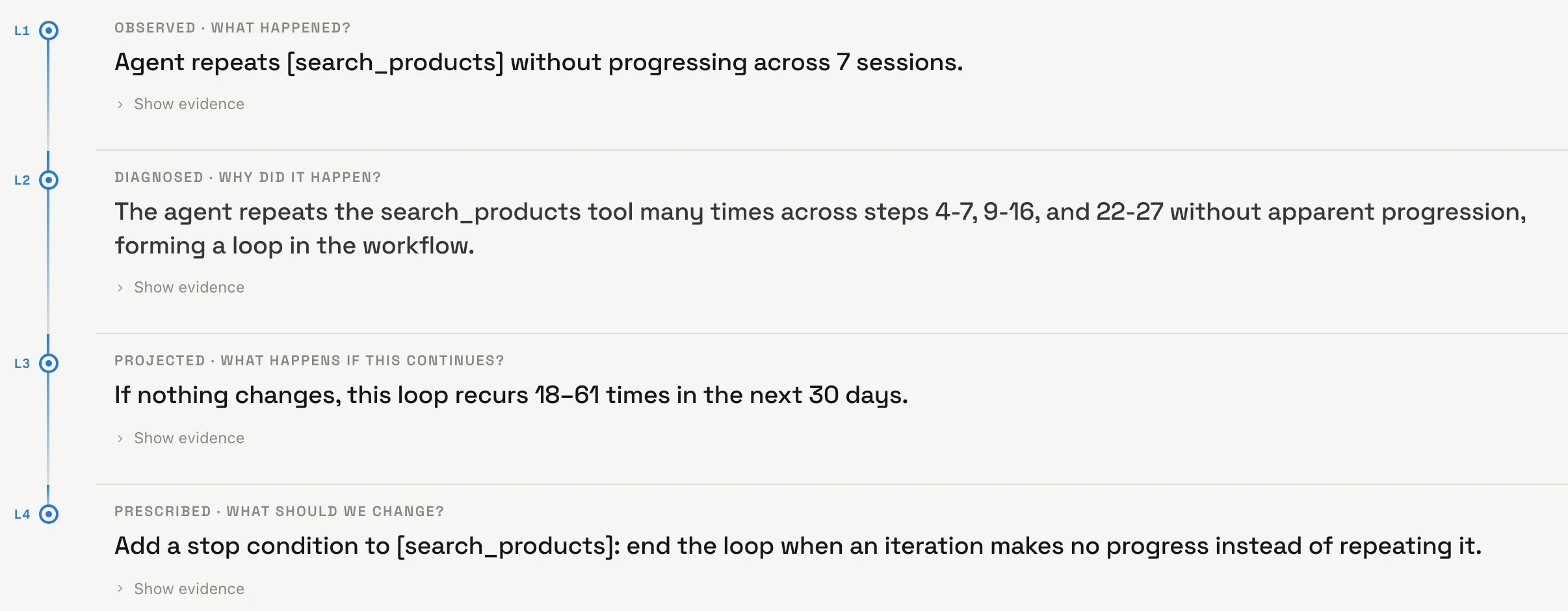
Findings also carry what they cost. Spend is priced per model call at the rate you pay, and repeated calls and loops show the time they burn.
When an agent starts acting differently, see what changed first
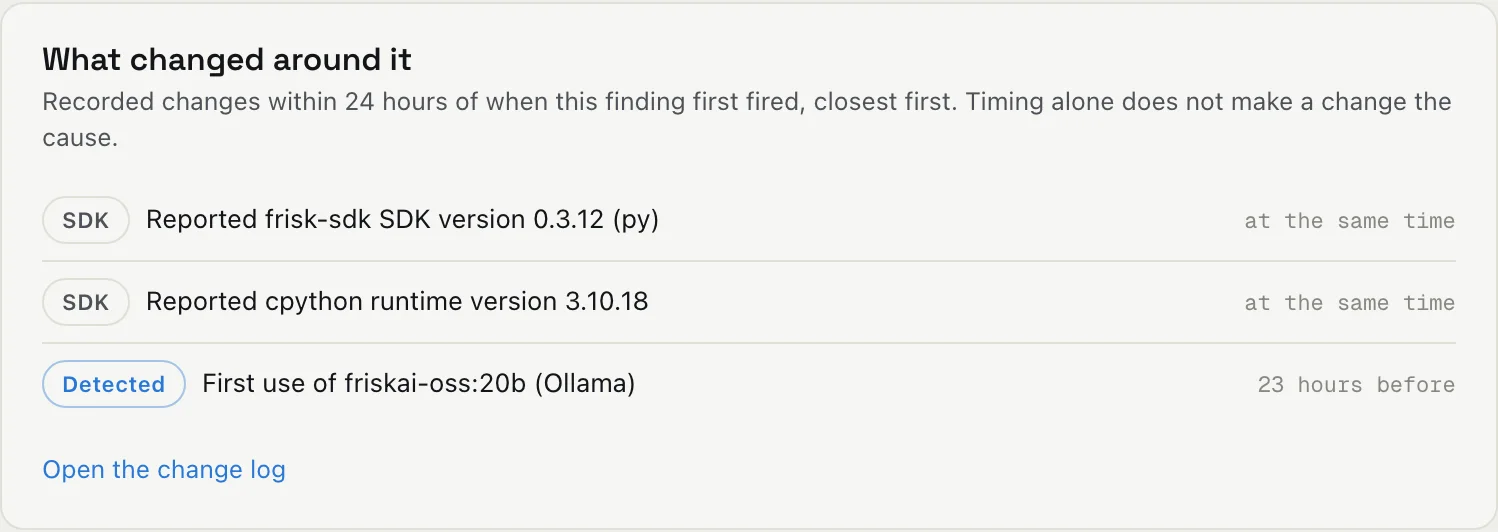
A new model, a prompt rewrite or an SDK upgrade can change how an agent behaves without anyone noticing. We record SDK upgrades and new models on our own, and your team can log deploys and prompt changes. Every finding shows what changed just before it started.
There’s more in the product, including findings, tools, detectors.
How FriskAI fits with what you already run
Most teams already collect the telemetry FriskAI reads, so it sits next to the tools you have.
- AI vendor analytics
- Each vendor shows you how its own product gets used. We put the agents you build and the AI tools you license in one place.
- Observability and tracing
- Keep your tracing. We read those traces and work out what the agent was trying to do, and whether today looks like a normal day for it.
- Security tools
- When your security tooling flags an event, we can show what the agent was asked to do and what it called before and after.
- Usage dashboards
- They count seats, tokens and spend. We show you the work those numbers paid for.
Start with one agent
Wrapping an agent with our SDK takes a few lines. If your telemetry already goes to Claude Code’s exporter, an OpenTelemetry pipeline, Datadog or Langfuse, we can read it from there instead.
- FriskAI SDKPython SDK, TypeScript SDK, LangChain and LangGraph, Claude Agent SDK, Strands Agents, Mastra, Custom runtimesAvailable
- Agent telemetryClaude Code, OpenTelemetry (OTLP)Early access
- Observability platformsDatadog, LangfuseEarly access
- Logs and exportsApplication and audit logs, Vendor admin exports, Data warehouse tablesCustom pipeline
import os
from langchain.agents import create_agent
from frisk_sdk.adapters.langchain import Frisk

frisk = Frisk(api_key=os.getenv("FRISK_API_KEY"))

agent = create_agent(
    model=get_llm(),
    tools=frisk.wrap_tools(llm_tools),
    system_prompt=system_prompt,
)
Questions we get a lot
Something we didn’t cover? Email us.
What do I need to get started?
One agent sending telemetry. Add the FriskAI SDK, or connect something you already run, like Claude Code, an OpenTelemetry pipeline, Datadog or Langfuse. Checks for loops, repeated calls and unused tools work from the first session. Checks that compare against a baseline need a little history first, and every finding tells you how much evidence it’s working from.
Do you need our prompts?
Only for the parts that are about content, like grouping what users ask into intents. Everything else runs on tool calls, arguments, timing and token counts. You decide what each source sends.
How do you work out spend?
Per model call, from list prices we keep up to date, at the rate that applied on the day. Add your negotiated rates and a monthly budget and the numbers match your bill. Tool calls are measured in time, so repeated calls and loops show the time they burn.
What won’t FriskAI catch?
We don’t grade whether an answer was correct. Judging quality and hallucination takes ground truth we don’t have, and splitting results by user needs a user id in your telemetry. What we tell you is whether a run behaved unusually or wastefully. The product lists these gaps right next to the detectors.
Will this be used to monitor employees?
No. FriskAI is built around agents, tools and sessions, and there are no per-person scores or rankings. You can open a single session to debug something, but the analysis is about how the work gets done.
Which agent frameworks do you support?
Python and TypeScript SDKs, with adapters for LangChain and LangGraph, the Claude Agent SDK, Strands Agents and Mastra. You can also wrap calls in a custom runtime. Claude Code, OpenTelemetry, Datadog and Langfuse are in early access.
Point FriskAI at one agent
Start free and connect it yourself, or book a demo and we’ll set it up with you.